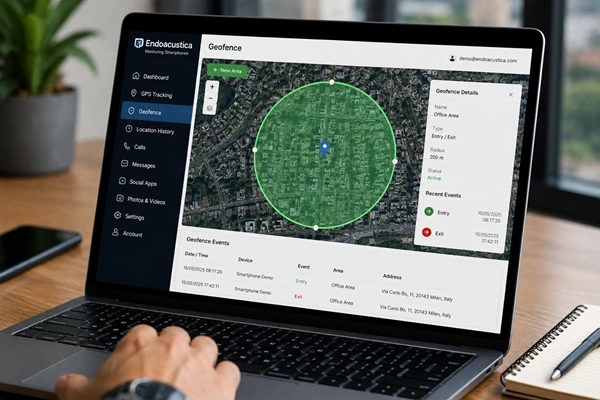
Geofencing is one of the most useful features available on modern monitoring smartphones. Unlike basic GPS location tracking, geofencing allows you to create one or more virtual boundaries on a map and automatically detect when a device enters, exits, or crosses a predefined area.
Instead of simply displaying the smartphone’s current location, the system continuously compares its position with the geofenced areas created by the user.
Let’s see how geofencing works and why it has become one of the most valuable features of today’s professional monitoring smartphones.
What Is Geofencing?
A geofence is a virtual boundary created around a specific geographic location.
It can be placed around virtually any location, including:
- a home;
- an office;
- a school;
- a warehouse;
- a parking lot;
- or any other point displayed on the map.
In most cases, a geofence is created by selecting a center point and defining a radius that can range from just a few feet to several hundred yards. Some monitoring platforms also allow users to create custom-shaped geofenced areas.
How Does Geofencing Work?
The entire process is fully automatic.
From the control panel, the user selects a location on the map and defines the size of the area to be monitored.
Once the geofence has been created, the smartphone continuously compares its current location with the virtual boundary.
Whenever the device:
- enters the area;
- leaves the area;
- or crosses the geofence boundary,
the system automatically records the event and makes it available through the monitoring platform.
How Is the Device’s Location Determined?
Geofencing does not rely solely on GPS.
Modern smartphones combine multiple positioning technologies, including:
- GPS;
- Wi-Fi networks;
- cell towers;
- Bluetooth;
- motion sensors.
By combining these technologies, the smartphone can continue estimating its location even when satellite signals become weak, such as inside office buildings, shopping malls, or underground parking garages.
If you’d like to learn more about these technologies, read our guides on indoor and outdoor location tracking and how smartphone sensors work.
Configuration Through the Control Panel
Geofencing is configured directly from the remote dashboard.
Simply:
- select a location on the map;
- set the geofence radius;
- choose which event to monitor.
Once the configuration is saved, the system continuously monitors the area automatically without requiring any further user interaction.
What Happens When a Geofence Is Crossed?
Whenever the smartphone crosses a virtual boundary, the monitoring platform automatically records the event.
Depending on the system configuration, the recorded information may include:
- the date of the event;
- the time;
- the location;
- whether the device entered or exited the geofenced area.
All events are automatically stored alongside the other monitoring data collected by the platform.
Geofencing and Location History
One of the most valuable features is the integration between geofencing and location history.
While location history records every route taken by the smartphone, geofencing automatically highlights when the device enters or leaves predefined areas.
Together, these technologies provide a much more complete picture of the device’s movements than GPS tracking alone.
To learn more, read our guide on How Location History Works on an Endoacustica Monitoring Smartphone.
When Is Geofencing Useful?
Geofencing can be used in a wide range of situations where it’s important to know when a smartphone enters or leaves a specific area.
For example, it can be used to:
- monitor company smartphones;
- verify arrivals and departures from a workplace;
- track movement between different operating locations;
- automatically record location-based events.
Its biggest advantage is automation.
Instead of constantly checking a map, the system automatically records every event whenever the smartphone crosses a predefined virtual boundary.
How Geofencing Works on Endoacustica Monitoring Smartphones
On Endoacustica monitoring smartphones, geofencing is fully integrated with all the other monitoring features available on the platform.
Geofence events can be viewed alongside location history, call monitoring, chat and social media monitoring, photo and video monitoring, and the other information collected by the device.
Everything is organized within a single remote dashboard, making it easy to review and manage all monitoring data from one place.
Why Is Geofencing Different from GPS Tracking?
GPS tracking simply shows the current location of a smartphone.
Geofencing goes one step further by monitoring the device’s movement in relation to user-defined virtual boundaries.
This allows the platform to automatically detect important events without requiring the user to continuously monitor the device’s location on a map.
Discover Endoacustica Monitoring Smartphones
Geofencing is just one of the many advanced features available on Endoacustica monitoring smartphones.
The platform also integrates GPS tracking, location history, call monitoring, chat and social media monitoring, photo and video monitoring, and many other functions accessible through a single remote dashboard.
Learn more about Endoacustica Monitoring Smartphones and discover the technologies behind today’s most advanced smartphone monitoring solutions.