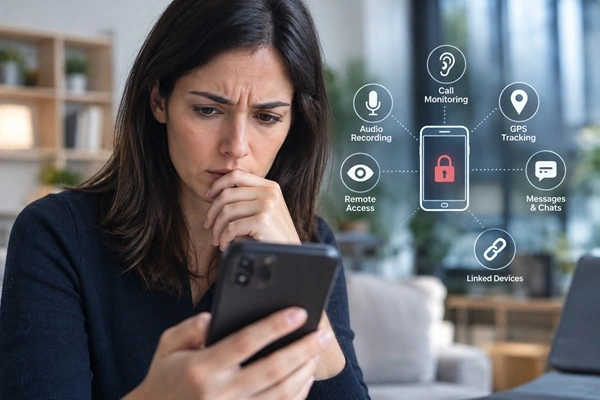
If you suspect that someone may be monitoring your smartphone, the first thing to understand is that there is no single warning sign, secret number, or dial code that can reliably tell you whether your phone is tapped.
Unexpected battery drain, unusual data usage, unfamiliar applications, changes to security settings, or unknown devices connected to your accounts may justify further investigation. However, none of these signs alone proves that your phone is being monitored.
Modern phone monitoring can also take different forms. It may involve spyware installed on the operating system, unauthorized access to cloud accounts, linked devices, altered system configurations, or, in more specialized cases, dedicated hardware installed inside the smartphone.
This guide explains how to tell if your phone is tapped or monitored, what the commonly recommended dial codes actually do, how to check Android and iPhone devices, and when a professional technical inspection may be necessary.
For a technical overview of the different technologies used for smartphone monitoring, see our guide to
professional spy phones and smartphone monitoring systems.
How Do I Know If My Phone Is Being Tapped or Monitored?
There is usually no single indication that confirms smartphone monitoring. The most useful approach is to look for several unusual behaviors and then investigate their possible causes.
Some signs that may justify additional checks include:
- Unusual battery drain: applications that continuously use the microphone, GPS, network connection, or background services can consume additional power.
- Unexpected mobile data usage: monitoring software may periodically transmit collected information to a remote server.
- Unknown applications: an app you do not remember installing deserves investigation, particularly if it has access to sensitive permissions.
- Unusual permissions: check which applications can access your microphone, camera, location, contacts, notifications, and other sensitive information.
- Unexpected security changes: unfamiliar accessibility services, device-management settings, profiles, or administrative permissions may require further investigation.
- Background activity: unexplained processor, battery, or network activity while the phone is not being actively used can be worth checking.
These are warning signs, not proof. Battery degradation, legitimate background applications, cloud synchronization, operating-system updates, and network problems can produce many of the same symptoms.
Is There a Number to Dial to See If Your Phone Is Tapped?
Searches for a number to dial to see if your phone is tapped often lead to lists of so-called secret codes. Some of these codes are legitimate network commands, but their purpose is frequently misunderstood.
For example, certain GSM and carrier codes can display information about call forwarding or other network services. Depending on the carrier and device, codes commonly discussed online may provide information about whether calls are being forwarded to another number.
A call-forwarding code is not a spyware detector.
It cannot examine the applications installed on your smartphone, determine whether someone has access to your online accounts, detect sophisticated malware, or identify an electronic component physically installed inside the phone.
For this reason, there is no universal number you can dial that will reliably tell you whether your phone is tapped, hacked, or monitored.
What About Codes to Check If Your Phone Is Monitored?
The same limitation applies to searches for a code to check if your phone is monitored or a number to dial to see if your phone is hacked.
Network codes can sometimes provide useful information about carrier services and forwarding configurations. They should not be confused with a security scan of the smartphone.
A modern smartphone contains several different layers that may need to be checked:
- installed applications;
- application permissions;
- operating-system settings;
- cloud accounts;
- linked devices and active sessions;
- device-management configurations;
- and, in specialized cases, the physical hardware.
No simple dial code can inspect all of these areas.
How to Know If Someone Is Tapping Your Phone Calls
People sometimes associate clicking noises, static, echoes, delays, or interruptions during a call with phone tapping. These symptoms should be interpreted carefully.
Modern cellular and VoIP communications can experience audio problems for many ordinary reasons, including weak coverage, network congestion, Bluetooth devices, Wi-Fi calling, latency, or temporary connection problems.
Therefore, strange noises during a call are not reliable evidence that somebody is tapping your phone calls.
A more useful investigation focuses on the smartphone itself, its accounts, permissions, applications, network activity, and configuration.
How Do I Know If My Phone Is Linked to Another Device?
Not every privacy problem requires spyware to be installed directly on the smartphone. In some cases, another person may have access to an account or a legitimately supported linked-device feature.
Check the devices and active sessions associated with your main accounts. Review any computers, tablets, browsers, or other smartphones that are authorized to access synchronized services.
Pay particular attention to devices you do not recognize and sessions from locations or systems that you cannot explain.
You should also review messaging applications that support companion or linked devices. If an unknown device has been authorized, information may be accessible without a traditional spy app operating in the way most users expect.
If you find an unknown session, remove it and secure the account from a trusted device by changing the password and enabling multi-factor authentication where available.
How to Check an Android Phone for Monitoring Software
Android generally provides considerable visibility into installed applications and their permissions, although the exact menu names vary between manufacturers and Android versions.
Start by reviewing the complete list of installed applications, rather than relying only on icons visible on the home screen.
Then check sensitive permissions, particularly access to the microphone, camera, location, contacts, notifications, SMS, and accessibility services.
Also review battery and mobile-data usage. An unfamiliar application that continuously operates in the background or communicates frequently with the Internet may deserve closer inspection.
Some monitoring applications may require elevated privileges, accessibility functions, or device-management permissions. These settings can be legitimate, so their presence alone does not establish that monitoring is taking place.
Endoacustica’s professional smartphone monitoring software provides a useful technical example of why permissions and operating-system configuration are important when analyzing software-based monitoring.
How to Check If Your Samsung Phone Is Tapped or Monitored
If you are specifically trying to determine how to check if a Samsung phone is tapped, the same principles used for Android apply.
Review installed applications, permissions, accessibility services, device-administration settings, battery activity, and mobile-data usage. Menu names and locations can vary according to the Samsung model and version of Android or One UI.
Samsung’s own security and privacy settings can also provide useful information about which applications recently accessed sensitive resources such as the microphone, camera, and location.
Again, the objective is not to find one magical indicator but to identify combinations of settings or activities that cannot be reasonably explained.
How to Check an iPhone for Spyware or Unauthorized Monitoring
iPhone requires a somewhat different approach because iOS operates in a more restricted environment than Android. Traditional applications have limited access to other applications and system information.
Start by checking installed apps and permissions for the microphone, camera, location, contacts, and other sensitive resources.
You should also review devices associated with your Apple Account, security settings, and any configuration or device-management profiles you do not recognize.
Account security is particularly important. Sometimes information is being accessed through a compromised cloud account rather than through spyware installed directly on the iPhone.
Use a strong, unique password and multi-factor authentication, and remove devices or active sessions that you cannot identify.
Can a Factory Reset Remove Spyware?
A full factory reset normally removes user-installed applications and can therefore eliminate many forms of software-based monitoring.
However, performing a reset immediately may not always be the best first step if you need to determine what happened to the device. Resetting the smartphone can destroy information that could otherwise be useful during a technical investigation.
There is another important limitation: a software reset does not physically inspect the smartphone.
A specialized hardware modification can operate independently of normal applications and therefore represents a completely different situation from conventional spyware.
Can Monitoring Hardware Be Hidden Inside a Smartphone?
This is an area that many general cybersecurity guides do not address.
Software checks can help identify suspicious applications, permissions, configurations, and network behavior. However, they cannot necessarily exclude the presence of dedicated electronic components installed inside the device.
A professional hardware modification can use circuitry that operates independently of the normal applications visible in Android or iOS. Checking the list of installed apps therefore cannot, by itself, detect this type of modification.
Endoacustica works directly with hardware-modified smartphones. This hands-on experience gives our technicians practical knowledge of both how these systems operate and why conventional software checks have limitations when physical modifications are involved.
How to Tell If Your Phone Is Tapped by the Police or Government
Searches such as “how to check if your phone is tapped by police” or “how to tell if your phone is tapped by the government” require an important distinction.
The checks described in this guide can help identify certain suspicious applications, unauthorized account access, unusual configurations, or physical modifications. They cannot reliably determine who is responsible for a suspected interception.
A consumer smartphone does not provide a universal indicator showing that a particular government agency or law-enforcement organization is monitoring it.
If you have a concrete reason to believe that your device has been compromised and the situation has legal implications, preserve the device and relevant evidence and seek appropriate technical and legal advice rather than relying on online dial-code tests.
What Should You Do If You Think Your Phone Is Being Monitored?
If you identify something genuinely suspicious, avoid making unnecessary changes before deciding whether a professional examination is required.
For immediate account security, use another trusted device where possible to change important passwords, enable multi-factor authentication, and review connected devices and active sessions.
Keep your operating system updated and install applications only from trusted sources.
If the situation is sensitive or you need to understand what is actually present on the smartphone, a professional technical inspection may provide considerably more useful information than simply resetting the device.
Professional Smartphone Inspection
We know these technologies because we analyze, configure, and test them directly.
This hands-on experience allows us to understand how they work, recognize their limitations, and determine which technical checks may help identify them.
If you suspect that your smartphone contains spyware, a hidden monitoring application, an unauthorized configuration, or another monitoring system, you can send the device to Endoacustica Europe for professional technical inspection.
Our technicians can examine the smartphone for suspicious software, configurations, and other anomalies and provide the results of the analysis. Where appropriate, the examination can also consider whether further physical inspection of the device is justified.
How to Protect Your Phone From Unauthorized Monitoring
Prevention remains one of the most effective forms of protection. Keep Android or iOS updated, use a strong screen-lock code, and avoid leaving an unlocked smartphone accessible to other people.
Periodically review installed applications and sensitive permissions. Remove applications you no longer use and investigate software that requests access inconsistent with its stated purpose.
Protect cloud accounts with unique passwords and multi-factor authentication. Regularly review connected devices and active sessions, particularly for email, cloud storage, Apple or Google accounts, and messaging services.
For users and organizations that require additional protection for sensitive communications, dedicated encrypted smartphone solutions can provide another layer of security.
Frequently Asked Questions
Is there a number to dial to see if my phone is tapped?
No universal dial code can reliably determine whether a smartphone is tapped. Some network codes can display call-forwarding information, but they do not scan the phone for spyware, account compromise, or hardware modifications.
Is there a code to check if my phone is monitored?
There is no universal monitoring-detection code. Checking applications, permissions, accounts, linked devices, security settings, and unusual activity provides considerably more useful information.
How do I know if my phone is linked to another device?
Review the devices and active sessions associated with your Apple, Google, messaging, email, and other important accounts. Remove devices you do not recognize and change the account password from a trusted device.
How can I check if my Samsung phone is tapped?
Review installed apps, sensitive permissions, accessibility services, device-management privileges, battery activity, and mobile-data usage. No single Samsung setting or dial code can conclusively determine that the phone is being monitored.
Can I tell if police or the government are tapping my phone?
The presence of suspicious software or configurations does not identify who installed or operates them. There is no universal consumer-phone indicator that reliably identifies monitoring by a specific law-enforcement or government organization.
Does a factory reset remove a spy app?
A factory reset can remove many user-installed software monitoring solutions, but it may also destroy information useful for a technical investigation. It also does not detect or remove physical hardware modifications.
Conclusion
If you are trying to determine whether your phone is tapped, hacked, monitored, or linked to another device, avoid relying on a single symptom or so-called secret dial code.
The most useful approach is systematic: review applications and permissions, check account security and linked devices, examine battery and network activity, keep the operating system updated, and investigate anything that cannot be reasonably explained.
It is equally important to understand the limits of these checks. Software inspection cannot necessarily detect a physical modification inside a smartphone, and unusual behavior alone does not prove that monitoring is taking place.
Our experience with both software and hardware smartphone monitoring technologies allows us to examine the issue from both sides: understanding how monitoring systems work also helps us understand how they can be identified.
For more information about the technologies involved, see our technical overview of professional spy phones.
Technical review: September 2026.