
Endoacustica offers, Exclusive Customer Service and free Training


DIGICELL · Voice and Telephone Recording
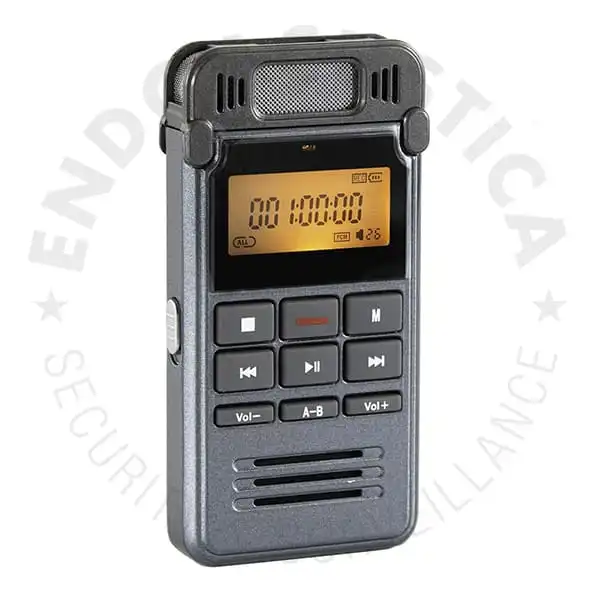
DIGICELL Portable Voice and Landline Recorder
DIGICELL records interviews, meetings and landline calls to 8 GB of internal memory. Use the built-in microphone, connect the included clip-on mic, or record from a compatible analog audio source. A backlit TFT display provides access to recordings for playback and file management without a computer.
- Four recording sources: built-in mic, external mic, landline and analog audio.
- Manual recording or voice activation with adjustable sensitivity.
- WAV files with PCM, HQ and LP recording modes.
- 600 mAh rechargeable battery: up to 20 hours under ideal conditions. Actual runtime varies with use.
- USB file transfer and an included landline recording adapter.
Product code: DIGICELL
€160
Buy OnlineFree consultation, training and technical support.
+39 080 302 6530
Four Ways to Record Audio
Built-in and external microphones
The built-in omnidirectional condenser microphone picks up sound from around the recorder. The included clip-on microphone lets you place the mic closer to the speaker.
Landline and analog audio inputs
Use the supplied telephone adapter to record landline calls, or connect a compatible analog audio output to record from other equipment.
Playback on the recorder
The backlit TFT display lets you select, play and delete recordings directly on DIGICELL. An earphone is included for playback.
Full Description
Portable recording for meetings and interviews
At 85 × 42 × 12 mm and 81 g, DIGICELL fits in a pocket or sits on a meeting table. Its built-in condenser microphone has an omnidirectional pickup pattern, capturing sound from around the recorder rather than from a single direction.
For interviews or a closer recording of one speaker, connect the supplied clip-on microphone to the external microphone input. The recorder can remain within reach while the mic is positioned near the person speaking.
Manual and voice-activated recording
Start a recording manually or use voice activation (VOX)Starts recording when sound exceeds a set threshold. Adjustable sensitivity lets you set that threshold for the room and the speaker’s voice. with adjustable sensitivity. Set the sensitivity to suit the speaker’s volume and background noise in the room.
Landline calls and external audio sources
The included telephone adapter provides a connection for recording landline calls. Compatibility depends on the telephone setup; PBX, digital and VoIP phones require a connection check before use.
DIGICELL also records from compatible analog audio outputs. This can provide external recording for certain wall microphones and audio transmitter receivers. The source’s output connection and signal level must match the recorder’s input.
8 GB storage with three recording modes
DIGICELL saves recordings as WAV files. Three modes offer different bitratesThe amount of audio data stored per second, measured in kbps. Bitrate is different from sample rate, which is measured in Hz or kHz. and storage times: PCM at 384 kbps stores approximately 44 hours, HQ at 192 kbps stores approximately 90 hours, and LP at 32 kbps stores approximately 560 hours on the 8 GB memory.
These figures describe storage capacity, not battery life. LP uses less space per hour; the higher-bitrate modes store more audio data per second.
USB file transfer and direct playback
Listen to recordings on DIGICELL with the included earphone, or transfer the files to a computer over USB. The recorder works as USB mass storage, allowing access to the saved files for playback and archiving.
A compatible smartphone can access the files through USB OTGUSB On-The-Go allows a supported phone to access USB peripherals, such as storage devices, through a suitable adapter.. The phone must support USB OTG, and an appropriate adapter is required. An OTG adapter is not listed among the included accessories.
Rechargeable battery and included accessories
The internal 600 mAh rechargeable lithium battery provides up to 20 hours of recording under ideal conditions. Actual runtime varies with use.
DIGICELL comes with an earphone, a landline adapter, a mini-jack adapter, a clip-on microphone and a USB cable.
Technical Specifications
| Product code | DIGICELL |
|---|---|
| Internal memory | 8 GB |
| Recording format | WAV |
| Built-in microphone | Omnidirectional condenser microphone (360° pickup) |
| Recording sources | Built-in microphone; external microphone; landline through supplied adapter; compatible analog audio source |
| Recording control | Manual or voice activation (VOX) with adjustable sensitivity |
| PCM mode | 384 kbps; approximately 44 hours on 8 GB |
| HQ mode | 192 kbps; approximately 90 hours on 8 GB |
| LP mode | 32 kbps; approximately 560 hours on 8 GB |
| On-device file management | Playback and deletion of recordings |
| Display | Backlit TFT |
|---|---|
| Computer connection | USB mass storage for file access and transfer |
| Audio and telephone connections | Mini-jack audio connections; RJ11 telephone connection through included adapter |
| Smartphone file access | Requires a USB OTG-compatible phone and suitable adapter |
| Computer requirements | USB mass storage support and a compatible WAV player |
| Battery | Internal rechargeable lithium battery, 600 mAh |
| Recording runtime | Up to 20 hours under ideal conditions. Actual runtime varies with use. |
| Dimensions | 85 × 42 × 12 mm |
| Weight | 81 g |
| Included accessories | Earphone, landline adapter, mini-jack adapter, clip-on microphone and USB cable |
Applications
Interviews, meetings and lectures
Use the built-in microphone for room audio or the clip-on mic for a closer recording of one speaker. Direct playback helps you review statements or check a passage before transferring the files.
Landline call recording
The included telephone adapter connects DIGICELL to a compatible landline setup. Calls are saved as WAV files, which can be transferred over USB for an organized call archive.
External recording for audio equipment
DIGICELL can record the analog output of a compatible receiver or microphone system. This adds file storage to equipment that provides an audio output but has no built-in recorder.
Frequently Asked Questions
Can DIGICELL record landline phone calls?
Yes, using the included telephone adapter. PBX, digital and VoIP setups require a compatibility check; a telephone jack alone does not establish compatibility.
Can I connect an external microphone?
Yes. DIGICELL has an external microphone input and includes a clip-on microphone. You can also record with its built-in omnidirectional microphone.
Does it support voice-activated recording?
Yes. VOX recording has adjustable sensitivity. Manual recording is also available.
Does the battery last for 560 hours?
No. Approximately 560 hours is the storage capacity in LP mode at 32 kbps. Battery life is up to 20 hours of recording under ideal conditions. Actual runtime varies with use.
What is the difference between PCM, HQ and LP?
PCM records at 384 kbps for approximately 44 hours of storage, HQ at 192 kbps for approximately 90 hours, and LP at 32 kbps for approximately 560 hours on 8 GB. These are bitrates, not sample rates.
Can I listen to recordings without a computer?
Yes. Select recordings on the TFT display and listen with the included earphone. You can also delete files directly on the recorder.
How do I transfer recordings to a computer or phone?
Connect DIGICELL to a computer over USB to access it as a storage device. Smartphone access requires USB OTG support and an appropriate adapter. Compatibility depends on the phone.
Consultation and Support
Telephone connections
Confirm the connection for your landline setup and the supplied recording adapter.
Recording settings
Get help selecting a recording mode and adjusting VOX sensitivity for your environment.
External sources and file transfer
Check the audio output of your source equipment and get assistance transferring or playing recordings.
Other Voice Recorders
Related Products
 EN-NOTE33
Professional Stereo Audio Recorder
Stereo alternative with dual microphone inputs, a headphone output and removable microSD storage.
 BLACK-BOX
 Mini Voice Recorder
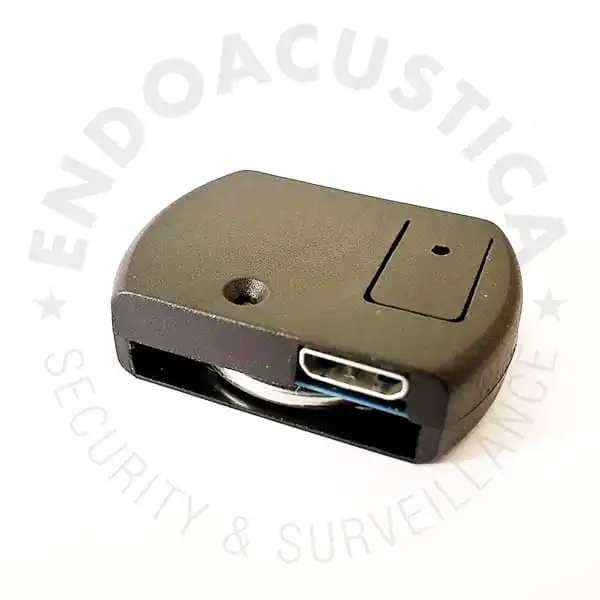
Scheduled recording, voice activation and dedicated software for accessing recorded files.
 SAB-R1
Slim Digital Voice Recorder
8 GB recorder with a microphone cable available in custom lengths on request.
 REC-20H
Mini Voice-Activated Recorder
Compact alternative with 16 GB of storage, a rechargeable battery and WAV recording.
DIGICELL
DIGICELL Product Information
Contact our technical team about telephone connections, external audio sources or ordering.